मैं आपको बताता हूँ।
पिछले महीने मेरे एक दोस्त ने फोन किया। वो परेशान था। उसका छोटा business था लेकिन invoicing और accounting में उसका दिमाग घूम रहा था।
“यार, मैं हर महीने हज़ारों रुपए CA को देता हूँ। फिर भी मेरे accounts clear नहीं हैं। GST filing में problem होती रहती है।”
मैंने उससे कहा – “Vyapar Invoice Billing App try कर।”
आज वो खुश है। उसका business smooth चल रहा है। CA का खर्च भी बच गया।
आखिर Vyapar App क्या है और क्यों सबको पसंद आ रहा है?
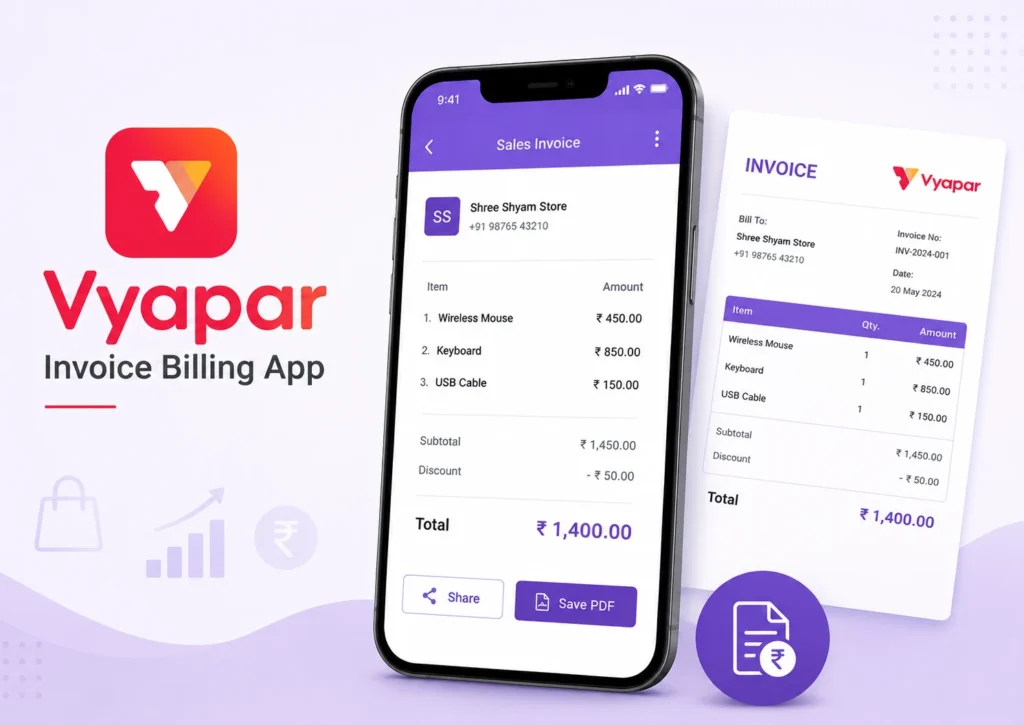
Vyapar एक complete billing और accounting solution है। ये specially Indian businesses के लिए बनाया गया है।
सबसे अच्छी बात? ये Hindi में available है। हमारी भाषा में।
मैं आपको step-by-step बताता हूँ कि ये कैसे आपकी life को easy बना सकता है।
Vyapar Invoice Billing App के मुख्य Features
1. Invoice और Bill Generation
- Professional invoices बनाएं seconds में
- Multiple formats available हैं
- Company logo add कर सकते हैं
- Tax calculations automatic होती हैं
- GST compliance fully maintained रहती है
Real talk – मैंने देखा है कि 90% small businesses invoice formatting में time waste करते हैं। Vyapar इस problem को solve करता है।
2. Inventory Management
यहाँ magic होता है।
- Stock levels track करें real-time में
- Low stock alerts मिलते हैं
- Purchase और sales automatically update होते हैं
- Barcode scanning भी available है premium version में
मेरा एक client कहता था: “Pehle main register में stock count करता था। Ab Vyapar में एक click में pata चल जाता है।”
3. GST और Tax Management
सबसे boring part को Vyapar ने interesting बना दिया है।
- GST rates automatically apply होती हैं
- GSTR-1 और GSTR-3B reports ready मिलती हैं
- Tax calculations में कोई error नहीं होती
- E-way bills भी generate कर सकते हैं



क्यों Vyapar Invoice Billing App दूसरे apps से better है?
Hindi Language Support
सच कहूँ तो यही सबसे बड़ा reason है।
English apps में अक्सर confusion होती है। Vyapar में सब कुछ Hindi में clear है। आपके staff को भी समझने में आसानी होगी।
Offline Mode
Internet की problem है India में। Vyapar offline भी काम करता है। Data sync हो जाता है जब internet आता है।
बिल्कुल seamless।
Cost-Effective Solution
देखिए मैं आपको numbers दूंगा:
Traditional CA Charges:
- Monthly: ₹5,000-₹15,000
- Yearly: ₹60,000-₹1,80,000
Vyapar Premium:
- Yearly: ₹6,600 only
आप खुद calculate करिए। Savings कितनी हो रही है।
Vyapar App कैसे Download और Setup करें?
Step 1: Download करें
Vyapar Invoice Billing App को Google Play Store से install करें।
Free version भी available है। Basic features के लिए sufficient है।
Step 2: Business Details Add करें
- Company name
- Address
- GST number
- Phone number
- Email ID
सब accurate भरें। ये details आपके invoices में appear होंगी।
Step 3: Products/Services Add करें
- Item name
- HSN code
- Tax rate
- Purchase price
- Selling price
एक बार setup कर दिया। बाद में automatic calculations होंगी।
Vyapar Invoice Billing के Advanced Features
1. Multi-User Access
Team के साथ काम कर सकते हैं। Different permissions set कर सकते हैं।
Manager को full access। Staff को limited access। Smart approach।
2. Reports और Analytics
यहाँ आपको business insights मिलते हैं:
- Sales reports – daily, monthly, yearly
- Purchase reports – supplier wise analysis
- Profit-loss statements – accurate calculations
- Tax reports – GST ready formats
- Outstanding payments – follow-up के लिए
3. Payment Tracking
- Pending payments track करें
- Payment reminders भेजें
- Cash flow monitor करें
- Credit/Debit balances maintain करें



Real Success Stories
Case Study 1: Electronics Shop Owner
Ramesh ji का electronics shop है Delhi में। Pehle unका accounting mess था।
“Main har transaction manually note करता था। Month end में GST filing में problem होती थी।”
Vyapar use करने के बाद:
- GST filing smooth हो गई
- Stock management automatic हो गया
- Monthly accounts clear रहने लगे
- Time बचने लगा business grow करने में
Case Study 2: Textile Wholesale Business
Priya ma’am का textile wholesale business है। Multiple suppliers और retailers के साथ deal करती हैं।
“Vyapar से pehle main Excel में सब manage करती थी। Calculations में mistakes होती थीं।”
Results after Vyapar:
- Error-free calculations
- Professional invoicing
- Better supplier relations
- Customer satisfaction increase
Vyapar App के Disadvantages (मैं honest हूँ)
1. Learning Curve
शुरुआत में थोड़ा confusing लग सकता है। लेकिन 2-3 दिन में आदत हो जाती है।
2. Premium Features Cost
Advanced features के लिए subscription लेनी पड़ती है। लेकिन value for money है।
3. Internet Dependency (कभी-कभी)
Reports sync करने के लिए internet चाहिए। Offline mode में limitations हैं।
Free vs Premium: कौन सा Choose करें?
Free Version में मिलता है:
- Basic invoicing
- Simple inventory
- 3 users तक access
- Limited reports
- Basic GST features
Premium Version (₹6,600/year) में Extra:
- Unlimited invoices
- Advanced inventory
- Unlimited users
- Barcode scanning
- E-way bill generation
- Advanced reports
- Priority support
मेरी recommendation: Free से start करें। Business grow हो तो premium लें।


Vyapar Invoice Billing Setup के लिए Pro Tips
Tip 1: Clean Data Entry
शुरुआत से ही accurate data डालें। बाद में correction मुश्किल होता है।
Tip 2: Regular Backup
Data backup regularly लेते रहें। Cloud sync enable करें।
Tip 3: Staff Training
Team को properly train करें। Video tutorials available हैं YouTube पर।
Tip 4: Customization
Invoices को अपने brand के अनुसार customize करें। Professional look मिलेगा।
Common Problems और Solutions
Problem 1: GST Rates Confusion
Solution: Vyapar में pre-defined GST rates हैं। HSN code डालें, rate automatic set हो जाएगी।
Problem 2: Inventory Mismatch
Solution: Regular stock audit करें। Physical count से match करते रहें।
Problem 3: Report Generation Issues
Solution: Premium version लें। Advanced reporting features मिलेंगे।
Problem 4: Multiple Businesses
Solution: Different companies के लिए separate accounts बनाएं।
Vyapar App के Alternatives
Honest comparison:
1. Marg ERP
- More complex
- Higher cost
- Better for large businesses
2. Busy Accounting
- Desktop-based
- Expensive
- Learning curve high
3. Zoho Books
- Cloud-based
- English interface
- Monthly subscription model
4. Tally
- Industry standard
- Complex for small businesses
- High cost
Reality check: छोटे businesses के लिए Vyapar सबसे practical है।
Future के लिए Vyapar कैसे Ready कर रहा है आपको?
Digital Transformation
Government digital push कर रही है। Vyapar आपको ready रखता है:
- E-invoicing support
- Digital payments integration
- Cloud storage
- Mobile accessibility
Compliance Updates
Tax rules change होते रहते हैं। Vyapar automatically update हो जाता है।
Business Growth Support
जैसे-जैसे business बढ़ेगा:
- More users add कर सकेंगे
- Advanced features unlock कर सकेंगे
- Multiple locations manage कर सकेंगे
Vyapar Invoice Billing App – Final Verdict
मैं आपको सच बताऊंगा।
Perfect solution कोई नहीं है। लेकिन Indian small businesses के लिए Vyapar सबसे practical है।
Pros:
- Hindi support
- Cost-effective
- Easy to use
- GST compliant
- Good customer support
Cons:
- Premium features costly लग सकते हैं
- Advanced customization limited है
Frequently Asked Questions (FAQs)
Q1: क्या Vyapar App completely free है?
A: Basic version free है। Advanced features के लिए premium subscription लेनी पड़ती है।
Q2: GST filing के लिए CA की जरूरत होगी?
A: Vyapar GST-ready reports देता है। Simple cases में CA की जरूरत नहीं। Complex cases में consultation ले सकते हैं।
Q3: Data security कैसी है?
A: Cloud backup available है। Data encryption के साथ secure रहता है।
Q4: Multiple businesses handle कर सकते हैं?
A: हाँ, अलग-अलग companies के लिए separate accounts बना सकते हैं।
Q5: Offline mode में कौन से features work करते हैं?
A: Basic invoicing और inventory management। Reports sync के लिए internet चाहिए।
Q6: Customer support कैसी है?
A: Hindi में support मिलता है। Phone, email, और chat options available हैं।
Q7: Migration दूसरे software से possible है?
A: Excel data import कर सकते हैं। Other software से migration support team help करती है।
Q8: Barcode scanning feature कैसे काम करता है?
A: Premium version में available है। Mobile camera से barcode scan करके inventory add कर सकते हैं।
अंत में…
मैंने आपको सब कुछ honest बताया है।
Vyapar Invoice Billing App perfect नहीं है। लेकिन Indian small businesses के लिए बहुत practical है।
Free version से start करें। Experience करें। फिर decide करें premium लेना है या नहीं।
मेरे experience में 80% small businesses के लिए ये sufficient है। बाकी 20% को more advanced solutions चाहिए होते हैं।
आप कौन से category में आते हैं? Try करके पता करें।
Vyapar Invoice Billing App आपके business की accounting problems solve कर सकता है – लेकिन सिर्फ तभी जब आप इसे properly use करें।